
Hiding Check Control messages
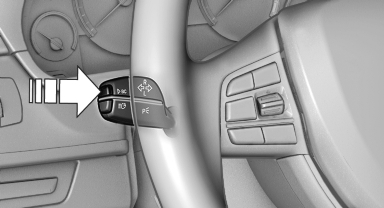
Press the computer button on the turn signal lever.
► Some Check Control messages are displayed continuously and are not cleared until the malfunction is eliminated. If several malfunctions occur at once, the messages are displayed consecutively.
These messages can be hidden for approx.
8 seconds. After this time, they are displayed again automatically.
► Other Check Control messages are hidden automatically after approx. 20 seconds.
They are stored and can be displayed again later.
See also:
Snow chains
Only certain fine-link snow chains have been
tested by BMW, classified as safe for use and
recommended. Consult your service center for
more information.
BMW X5: use only in pairs on the rear w ...
Malfunction
The yellow warning lamp flashes and
then lights up continuously. A Check
Control message is displayed. No flat
tire can be detected.
Display in the following situations:
▷ A wheel with ...
Compact Design
Just as BMW's compact 3 Series ranks below the midsize 5 Series, the
five-seat X3 sits in the shadow of the larger X5. The styling clearly says BMW,
but it's the multi-paneled look of earlier mode ...