
Instrument cluster
At a glance
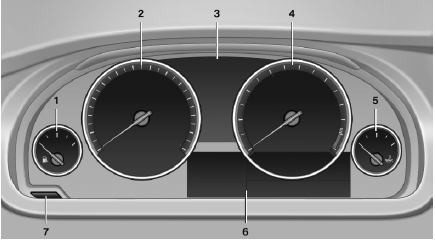
1 Fuel gauge
2 Speedometer
3 Indicator/warning lamps
4 Tachometer
5 Engine oil temperature
6 Electronic displays
7 Reset miles
See also:
All around the steering wheel
All around the steering wheel
1. Rear window safety switch
2. Power windows
3. Exterior mirror operation
4. Lamps
Instrument lighting
&n ...
Displays in the instrument cluster
The transmission position is
displayed,
e.g.: P. ...
The concept
This system can replace up to three different
hand-held transmitters for various types of remote-
controlled equipment, such as garage
doors or lighting systems.
The hand-held transmitter signa ...