
Rear seat heating
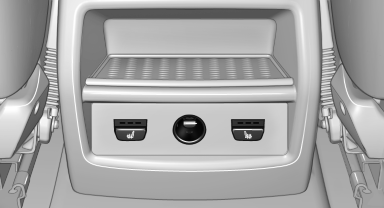
Switching on
 Press the button once for each
temperature
level.
Press the button once for each
temperature
level.
The maximum temperature is reached when three LEDs are lit.
If the drive is continued within approx. 15 minutes, the seat heating is activated automatically with the temperature selected last.
Switching off
Press the button longer.
The LEDs go out.
See also:
Message when the system was not reset
The yellow warning
lamp lights up. A
message appears on the Control Display.
The system detected a wheel change but was
not reset.
Warnings regarding the current tire inflation
pressure are ...
Bypassing a section of the route
Calculate a new route for a route section.
1. "Navigation".
2. "Route information".
3. "New route for"
4. Turn the controller. Enter the number of
miles within wh ...
Interrupting the system
Press the lever up or down, arrow 3: display 1 in
the speedometer changes color
In addition, the system is interrupted:
▷ When the brakes are applied.
▷ When the transmission position ...