
Automatic locking
The setting is stored for the remote control currently in use.
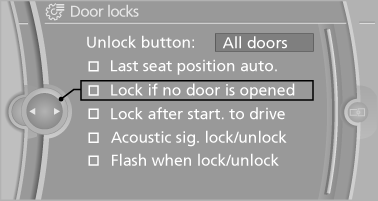
1. "Settings"
2. "Door locks"
3. Select the desired function:
► "Lock if no door is opened"
The vehicle locks automatically after a
short period of time if a door is not
opened.
► "Lock after start. to drive"
The vehicle locks automatically after
you drive away.
See also:
Use high-quality brands
Field experience has indicated significant differences
in fuel quality: volatility, composition, additives,
etc., among gasolines offered for sale in
the United States and Canada. Fuels containi ...
Tire Pressure Monitor TPM
The concept
The tire inflation pressure is measured in the
four mounted tires. The system notifies you if
there is a significant loss of pressure in one or
more tires. ...
Language
Setting the language
To set the language on the Control Display:
1. "Settings"
2. "Language/Units"
3. "Language:"
4. Select the desired language.
The setting is s ...