
Replacing the battery
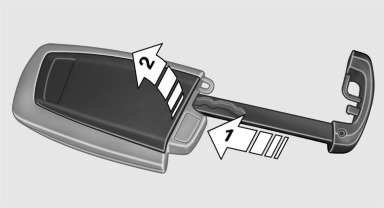
1. Take the integrated key out of the remote
control.
2. Push in the catch with the key, arrow 1.
3. Remove the cover of the battery compartment;
see arrow 2.
4. Insert a battery of the same type with the
positive side facing upwards.
5. Press the cover closed.
 Take the used battery to a
recycling center
or to your service center.
Take the used battery to a
recycling center
or to your service center.
See also:
Automatic climate control with 2-zone control
Automatic climate control with 2-zone control
1. Seat heating and ventilation, driver's side
2. Temperature, left side of passenger compartment
3. AUTO program
4. Temperature, right side of pas ...
Vehicle equipment
All standard, country-specific and optional
equipment that is offered in the model series is
described in this chapter. Therefore, equipment
is also described that is not available in a vehicle, ...
Protective action
Airbags are not triggered in every impact situation,
e.g., in less severe accidents or rear-end
collisions.
Information on how to ensure
the optimal
protective effect of the airbags
▷ ...