
Entering a phone number
Dialing a number
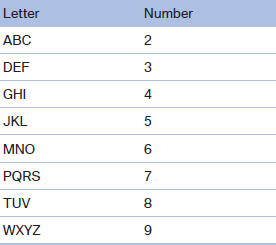
When entering phone numbers, you can switch between entering letters and numbers.
Service numbers can be entered more easily, e. g. 1-888-BMW-CARD.
1. "Telephone"
2. "Dial number"
3. Select the digits individually.
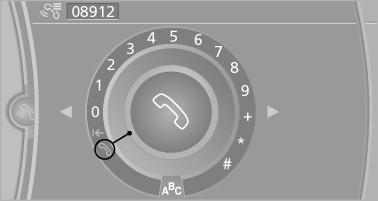
4. Convert to letters as required.
 Select the symbol.
Select the letters individually.
5.  Select the symbol.
 Select symbol to convert to
numbers.
Select symbol to convert to
numbers.
The phone number can also be entered by voice.
Only numbers can be spoken.
Letter/number assignment
See also:
General information
The glass sunroof and the sliding visor can be
operated together or separately, using the same
switch.
The glass sunroof is operational when the ignition
is switched on.
Danger of pinching
Mo ...
Using the remote control
General information
Take the remote control with you
People or animals left unattended in a
parked vehicle can lock the doors from the inside.
Always take the remote control with you
when leav ...
Selecting a category
1. "Radio"
2. "Satellite radio"
3. "Category"
4. Select the desired category. ...