
Controls
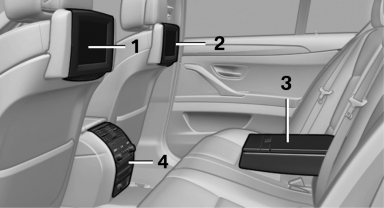
1 Screen, left
2 Screen, right
3 Center armrest, remote control
4 CD/DVD player
See also:
Radar sensors
The radar sensors are located under the rear
bumper.
The system may not be fully functional in the
following situations:
▷ Dirty or icy bumper.
▷ Stickers on the bumper.
A Check ...
Roadside Assistance
At a glance
BMW Roadside Assistance can be contacted if
assistance is needed in the event of a breakdown.
Roadside Assistance can also be contacted via
a Check Control message.
Start Roadside A ...
Requirements
Via the Control Display, set a language that is
also supported by the voice activation system
so that the spoken commands can be identified.
Set the language. ...