
At a glance
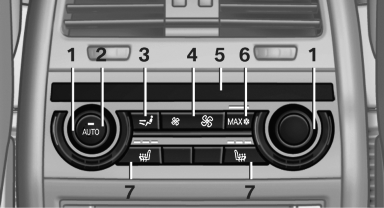
1. Temperature
2. AUTO program
3. Vent settings
4. Air volume, AUTO intensity
5. Display
6. Maximum cooling
7. Seat heating
See also:
TeleService Battery Guard
TeleService Battery Guard continually checks
the battery charge level of the vehicle. If the battery
charge level falls below a certain value, a
notification is automatically sent to your servic ...
Coupe: roof-mounted luggage rack
A special rack system is available as an option for your BMW. Comply with the
directions given in the installation instructions.
Mounting points
Fold open the cover.
Loading roof-mounted luggage ...
1975: the first generation - premiere as a two-door sedan with high-output
four-cylinder engines
The presentation of the first BMW 3-Series in July 1975 saw BMW write a new
chapter into the automotive history books. The two-door sedan wasted no time in
leaving its own distinctive stamp on the ...