
Front ventilation
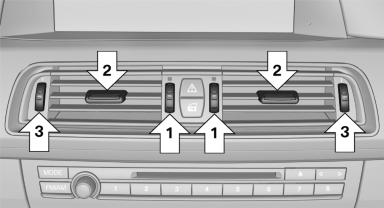
▷ Thumbwheels for adjusting the temperature,
arrows 1.
Toward blue: colder.
Toward red: warmer.
▷ Lever for changing the air flow direction, arrow
2.
▷ Thumbwheels for opening and closing the
vents continuously, arrows 3.
Ventilation levels
▷ Draft-free ventilation:
Thumbwheel, arrow 3, in level  : the
air
current is fanned out.
: the
air
current is fanned out.
▷ Maximum air volume:
Thumbwheel, arrow 3, in level  : the
air is
partially fanned out and partially bundled.
: the
air is
partially fanned out and partially bundled.
This maximizes the air supply.
▷ Direct ventilation:
Thumbwheel, arrow 3, in level  : the
air is
bundled and can be directed to a specific
point.
: the
air is
bundled and can be directed to a specific
point.
Adjusting the ventilation
▷ Ventilation for cooling:
Adjust the vent to direct the air in your direction,
e.g., if the vehicle interior is hot from
the sun.
▷ Draft-free ventilation:
Adjust the vent to let the air flow past you.
See also:
At a glance
These overviews of buttons, switches and
displays are intended to familiarize you with your
vehicle. You will also become quickly acquainted
with the available control concepts and options. ...
The concept
The system issues a two-phase warning of a
danger of collision at speeds above approx.
10 mph/15 km/h.
The collision warning is available even if cruise
control has been deactivated.
It resp ...
At a glance
The destinations previously entered are stored
automatically.
These destinations can be called up and used
as a destination for destination guidance. ...