
Display in the instrument cluster
The collision warning can be issued in the instrument cluster, in the Head-up Display, and acoustically.
Warning stages
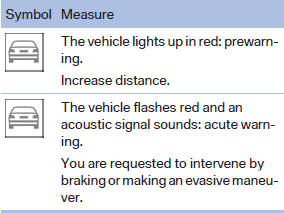
 Adapting your speed and driving style
The display does not relieve the driver of
the responsibility to adapt his or her driving
speed and style to the traffic conditions.◀
See also:
Displays in the instrument cluster
Selected program
The selected program is
displayed
in the tachometer.
Program selection
Pressing the button displays a
list
of the selectable programs.
Display on the Control Display
Pr ...
Activating/deactivating the functions
Several menu items are preceded by a checkbox.
It indicates whether the function is activated
or deactivated. Selecting the menu item
activates or deactivates the function.
The function is ac ...
Tire inflation pressure values over
100 mph/160 km/h
740i, 740Li, 750i, 750Li
Without high-speed tuning feature
760i, 760Li
Without high-speed tuning feature
With high-speed tuning feature
750i xDrive, 750Li xDrive
Without high-speed tun ...