
Buttons at a glance
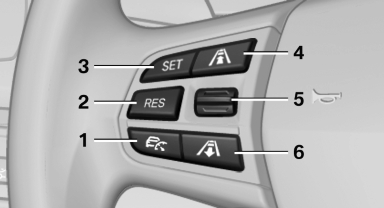
1. System on/off, interrupt
2. Resume speed
3. Store speed
4. Reduce distance
5. Store, maintain/change speed
6. Increase distance
See also:
Manual air distribution
The air flow can be guided into the vehicle interior,
separately for the driver's and front passenger
side, using one of the following programs:
▷ Upper body region.
▷ Upper body reg ...
Fuel filler flap
Opening
1. Open the fuel filler flap. To do so, lightly press the rear edge.
2. Turn the fuel cap counterclockwise.
3. Place the fuel cap in the bracket attached to the fuel fille ...
Front head restraints
Correctly adjusted head restraint
A correctly adjusted head restraint reduces the
risk of injury to cervical vertebrae in the event of
an accident.
Adjusting the head restraint
Correctly adjust ...