
SPORT
Consistently sporty tuning of the suspension for greater driving agility with maximum driving stabilization.
The program can be configured to individual specifications.
The configuration is stored for the remote control currently in use.
Activating SPORT
 Press the button repeatedly
until
SPORT appears in the tachometer.
Press the button repeatedly
until
SPORT appears in the tachometer.
Configuring SPORT
If the display on the Control Display, is activated, the sport program can be set to individual specifications.
After the sport program is activated, select "Configure SPORT mode" on the displayed panel and configure the program.
Optionally, the sport program can be configured before it is activated:
1. "Settings"
2. "SPORT mode"
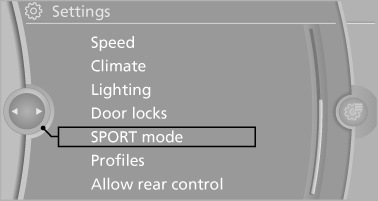
3. Configure the program.
This configuration is retrieved when the sport program is activated.
See also:
INTERIOR
The X5's interior lives up to luxury standards; it's not flashy, but the
quality materials used inside and the attention to detail tell you it's no
ordinary vehicle. My test car had upgrades like ...
Warning of people in danger
If the system detects a person in the defined
area in front of the vehicle and if there is the danger
of a collision with this person, a warning
symbol appears in the Control Display and
Hea ...
Opening and closing: Using the door lock
You can set the way in which the car is unlocked.
Do not lock the vehicle from the outside if
there is any person inside, because the vehicle cannot be unlocked from inside without
special kno ...