
Display
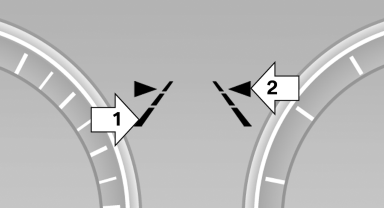
▷ Lines, arrow 1: the system is activated.
▷ Arrows, arrow 2: at least one lane marking
was detected and warnings can be issued.
See also:
Language
Setting the language
Setting the language
To set the language on the Control Display:
1. "Settings"
2. "Language/Units"
3. "Language:"
Language
4. Select the de ...
Continuing destination guidance
If the destination was not reached during the last trip, destination guidance
can be resumed.
"Resume guidance" ...