
Units of measure
Setting the units of measure
To set the units for fuel consumption, route/distance and temperature:
1. "Settings"
2. "Language/Units"
3. Select the desired menu item.
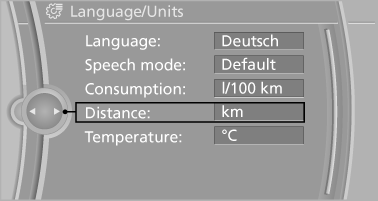
4. Select the desired unit.
The setting is stored for the remote control currently in use.
See also:
Snap-in adapter
Installation position
In the center armrest. ...
Driving stability control systems
Your BMW has a number of systems that help to maintain the vehicle's stability
even in adverse driving conditions.
Antilock Brake System ABSABS prevents locking of the wheels during braking. Sa ...
Status information
Status boxThe status box at the top right displays the following information:
> Time
> Current entertainment source
> Sound output ON/OFF
> Mobile phone network with strongest receptio ...