
Calling up information on the info display
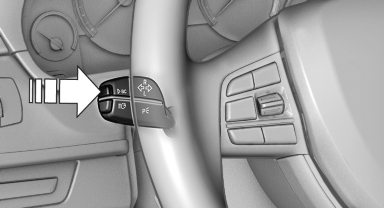
Calling up information on the info
display
Press the computer button on the turn signal lever.
Information is displayed on the info display of the instrument cluster.
See also:
Navigation system
General information
The navigation system can determine the precise
position of the vehicle, with the aid of satellites
and vehicle sensors, and can reliably
guide you to every entered destinat ...
Contacts
Vehicle equipment
All standard, country-specific and optional
equipment that is offered in the model series is
described in this chapter. Therefore, equipment
is also described that is not availab ...
Date
The settings are stored for the remote control currently in use, refer also to
Personal Profile on page 28.
Setting the dateIn the instrument cluster
To set the dd/mm or mm/dd date format, refer t ...