
Overview, instrument cluster with enhanced features
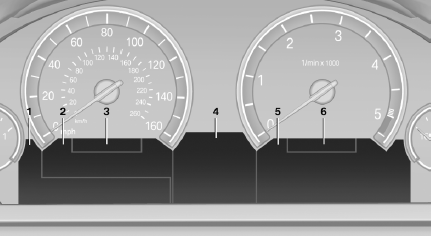
1. Messages, e.g. Check Control
Time
Date
2. Range
3. Computer
4. Navigation display
Service requirements
Miles/trip miles
5. Selection list, for instance radio
Current fuel consumption
Energy recovery
External temperature
6. Transmission display
See also:
1990: the third generation - premiere of the BMW 3-Series Coupé and BMW
3-Series Compact, new six-cylinder petrol and turbodiesel engines
1990 saw the introduction of the third-generation 3-Series, the four-door
Sedan taking to the stage on a wave of elegance and new technology. On top of
this, the dimensions of the body and the spa ...
Automatic deactivation during forward
travel
The system switches off when a certain driving
distance or speed is exceeded.
Switch the system back on if necessary. ...
Switching between cases, letters and numbers
Depending on the menu, you can switch between
entering upper and lower case, letters
and numbers:
Without navigation system
Select the
symbol. ...