
Folding forward
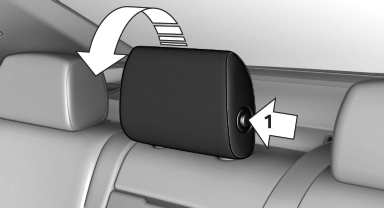
Press the button, arrow 1, and fold the head restraint forward.
See also:
Automatic-Transmission
Switching off the engine
1. Engage transmission position P with the vehicle
stopped.
2. Press the Start/Stop button.
The engine is switched off.
The radio ready state is switched on.
3. Set th ...
Controls on the interior rearview mirror
► LED, arrow 1.
► Buttons, arrow 2.
► The hand-held transmitter, arrow 3, is required
for programming. ...
Under the Hood
The 528i has a 240-horsepower, 3.0-liter six-cylinder, while the 535i gets a
300-hp, turbocharged 3.0-liter six-cylinder. The 550i has a twin-turbo,
4.4-liter V-8 that makes 400 hp. All three use ...