
Adjusting the height
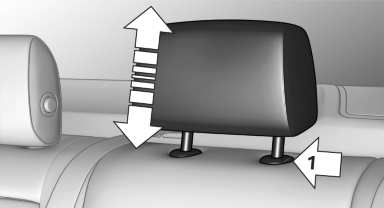
▷ To raise: pull.
▷ To lower: press the button, arrow 1, and
push the head restraint down.
See also:
PDC Park Distance Control
The concept
In addition to the PDC Park Distance Control, the
backup camera*, can be
switched on.
PDC supports you when parking. Objects that
you are approaching slowly in front of or behind
...
Text messages
Calling the sender of a text message
1. Select the desired message.
2. Select the symbol.
Saving the sender in the contacts
1. Highlight the desired message.
2. Open "Options".
3. &quo ...
Winter tires
The manufacturer of your vehicle recommends
winter tires for winter roads or at temperatures
below +45 ℉/+7 ℃.
Although so-called all-season M+S tires do provide
better winter tract ...