
Adjusting the height: manual head restraints
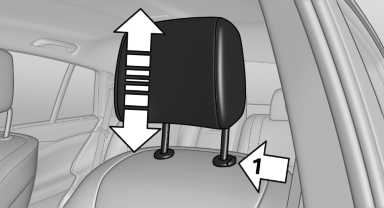
Adjusting the height: manual head
restraints
▷ To raise: pull.
▷ To lower: press the button, arrow 1, and push the head restraint down.
See also:
Socket for OBD Onboard
Diagnosis
There is an OBD socket on the driver's side for
checking the primary components in the vehicle
emissions.
Emissions
The warning lamp lights up:
Emissions are deteriorating. Have
the vehic ...
Switching the wipers on/off and brief wipe
Do not switch on the wipers if frozen
Do not switch on the wipers if they are frozen
onto the windshield; otherwise, the wiper
blades and the windshield wiper motor may be
damaged.
Switch ...
After washing the vehicle
After washing the vehicle, apply the brakes
briefly to dry them; otherwise, braking action can
be reduced and corrosion of the brake discs can
occur. ...