
Integrated key
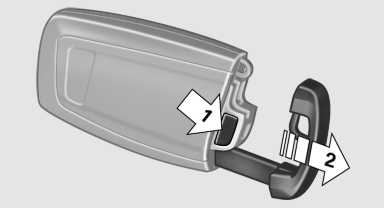
Integrated key
Press the button on the back of the remote control, arrow 1, and pull out the key, arrow 2.
The integrated key fits the following locks:
▷ Driver's door.
▷ Storage compartment in the front center
armrest.
The storage compartment contains a switch for separately securing the trunk lid
See also:
Reading lamps
Press the button.
Reading lamps are located at the front and rear
next to the interior lamps.
With the interior lamps shut off, the reading
lamps cannot be switched on. ...
Switching on/off manually
Press the button.
On: the LED lights up.
Off: the LED goes out.
The PDC is shown on the Control Display.
Switch on the backup camera via the iDrive. ...
The concept
The iDrive combines the functions of a multitude
of switches. Thus, these functions can be operated
from a central location.
Using the iDrive during a trip
To avoid becoming distracted and posi ...