
General information
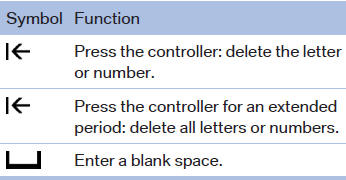
1. Turn the controller: select letters or numbers.
2. Select additional letters or numbers if
needed.
3. "OK": confirm the entry.
See also:
Summer tires
Do not drive with a tire tread depth of less than
0.12 in/3 mm.
There is an increased danger of hydroplaning if
the tread depth is less than 0.12 in/3 mm. ...
Playing music
Music search
All tracks for which additional information has
been stored can be accessed by the music
search. Tracks without additional information
can be called up via the corresponding album. ...
Operation
Adjusting the volume
Turn the knob until the desired volume is reached. The setting is stored for
the remote control currently in use.
The vehicle automatically adjusts the volume of the microphon ...