
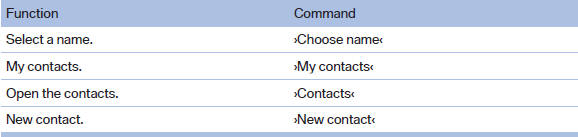
Contacts
See also:
Behind the center armrest
The cooler is located behind the center armrest
in the rear.
Fold the center armrest down. ...
Storing a channel
1. "Radio"
2. "Satellite radio"
3. If necessary, open "All channels" or the desired category.
4. Select the desired channel.
5. Press the controller again.
6. Press ...
Opening the Options menu
Press the button.
The "Options" menu is displayed.
Additional options: move the controller to the
right repeatedly until the "Options" menu is displayed.
Options menu
The ...