
CD/Multimedia
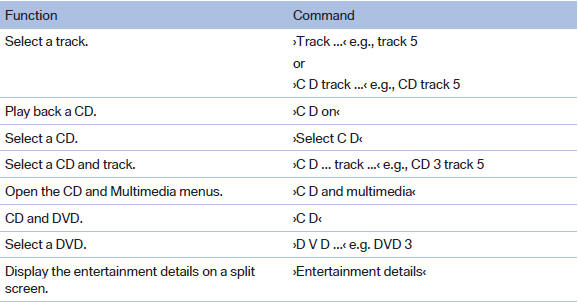
CD/DVD drive
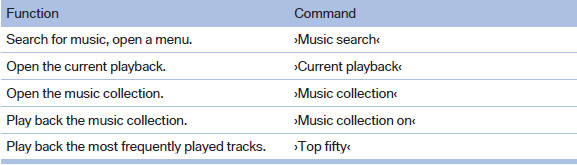
Music collection
External devices

Tone

See also:
Sockets
The lighter socket can be used as a socket for
electrical equipment while the engine is running
or when the ignition is switched on. The total
load of all sockets must not exceed 140 watt at
1 ...
BMW Search
At a glance
A business search can be opened via BMW
Search.
License conditions
This product contains NetFront Browser software
of ACCESS Co., Ltd. Copyright © 2007
ACCESS Co., Ltd. All rights ...
Displays
Program selection
Pressing the button displays a list
of the selectable programs.
Selected program
The selected program is displayed
in the instrument cluster.
Display on the Control D ...