
Radio
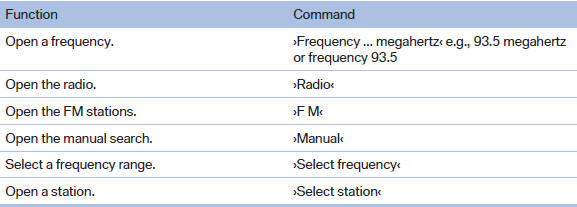
FM
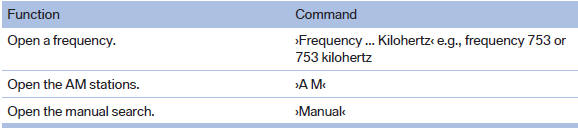
AM
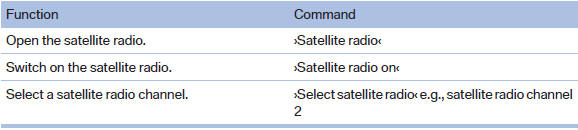
Satellite radio
Stored stations

See also:
Parking lamps
Switch position
: the vehicle lamps light
up on all sides, e.g., for parking.
Do not use the parking lamps for extended periods;
otherwise, the battery may become discharged ...
Rear
Opening
Press on the cover.
Emptying
Take out the insert.
Lighter
Push in the lighter.
The lighter can be removed as soon as it pops
back out.
Danger of burns
Only hold the hot lighter ...
Head-Up Display with full-colour capability
The new-generation Head-Up Display delivers even greater display quality,
functionality and flexibility. The symbols projected onto the windscreen are
displayed in sharp resolution in the driver's ...