
Navigation
General information
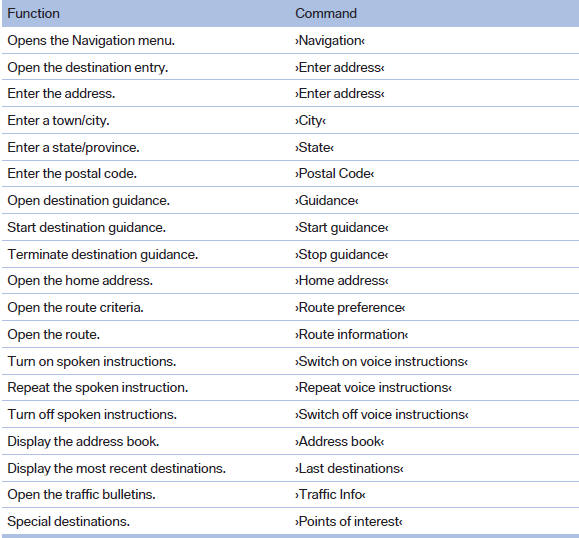
Map

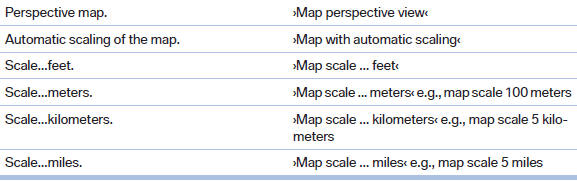
Split screen settings
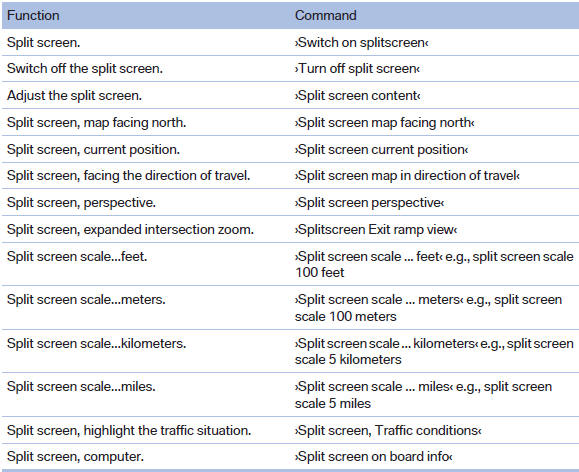

Destination guidance with intermediate destinations

See also:
Dynamic Driving Control
The concept
Dynamic Driving Control can be used to adjust
the driving dynamics of the vehicle. Several programs
are available for this purpose; they can be
activated using the two Dynamic Drivi ...
Calibrating the digital compass
The digital compass must be calibrated in the
event of the following:
▷ The wrong point of the compass is displayed.
▷ The point of the compass displayed does
not change despite chan ...
Correctly adjusted head restraint
A correctly adjusted head restraint reduces the
risk of injury to cervical vertebrae in the event of
an accident.
Adjusting the head restraint
Correctly adjust the head restraints of all
occu ...