
Vehicle information
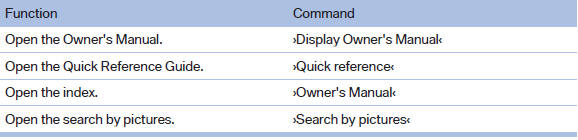
Owner's Manual
Computer

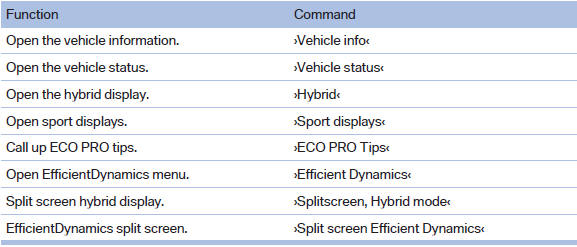
Vehicle
See also:
Switching spoken instructions on/off
The setting is stored for the remote control currently
in use.
1. "Navigation"
2. "Map"
3. "Voice
instructions" ...
Using the door lock
General information
Do not lock from the outside
Do not lock the vehicle from the outside if
there are people in it, as the vehicle cannot be
unlocked from inside without special knowledge.
...
Tire Pressure Monitor TPM
The concept
The tire inflation pressure is measured in the
four mounted tires. The system notifies you if there is a significant loss of
pressure in one or
more tires.
Functional requirements
T ...