
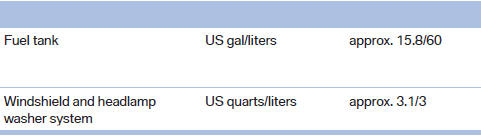
Capacities
See also:
Note
Children in the vehicle
Do not leave children unattended in the
vehicle; otherwise, they could endanger themselves
and other persons, e.g., by opening the
doors.◀ ...
Using voice activation
Activating the voice activation system
1. Briefly press
the button on the
steering wheel.
2. Say the command.
Terminating the voice activation
system
Briefly press the
button on the stee ...
Loading
Overloading the vehicle
To avoid exceeding the approved carrying
capacity of the tires, never overload the vehicle.
Overloading can lead to overheating and increases
the rate at which damage d ...