
My Info
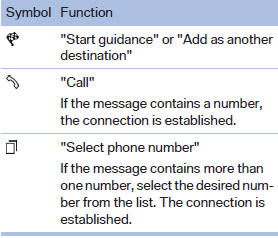
Selecting additional functions
Additional functions are available when a message is selected:
See also:
SPORT
Consistently sporty tuning of the suspension for
greater driving agility with maximum driving stabilization.
The program can be configured to individual
specifications.
The configuration is stor ...
Driving stability control systems
Your BMW has a number of systems that help to maintain the vehicle's stability
even in adverse driving conditions.
Antilock Brake System ABSABS prevents locking of the wheels during braking. Sa ...
Resetting the tone settings
1. "CD/Multimedia", "Radio" or "Settings"
2. "Tone"
3. "Reset" ...