
Filtering the message list
The message list can be filtered when more than one type of message exists.
1. "Filter:"
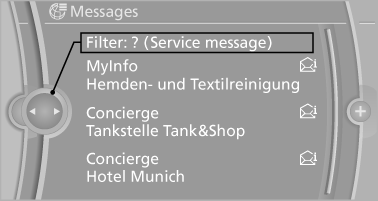
2. Select the type of message.
▷ "All"
All messages are displayed.
▷ "E-mail"
Only e-mails from the mobile phone are displayed.
▷ "Service message"
Only messages from the BMW Assist Concierge service, My Info and BMW Info are
displayed.
▷ "Text message"
Only text messages from the mobile phone are displayed.
See also:
Front lamps, bulb replacement
Halogen headlamps
At a glance
1. High beams
2. Parking lamps
3. Low beams
4. Turn signal
Parking lamps and roadside parking lamps,
lateral turn signal lamp
Follow the general instructions o ...
Entering letters and numbers
1. Turn the controller: select letters or numbers.
2. Select additional letters or numbers if
needed.
3. "OK": confirm the entry.
Switching between letters and
numbers
Depending on ...
Vehicle equipment
All standard, country-specific and optional
equipment that is offered in the model series is
described in this chapter. Therefore, equipment
is also described that is not available in a vehicle, ...