
Phone book
Displays
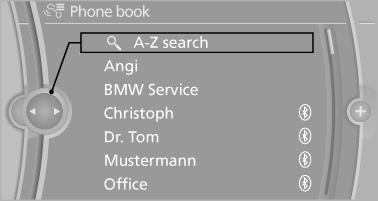
The phone book accesses the contacts and shows all contacts for which a phone number has been stored. The entries can be selected to make a call.
1. "Telephone".
2. "Phone book"
A symbol indicates the storage location of the contacts.
Calling a contact
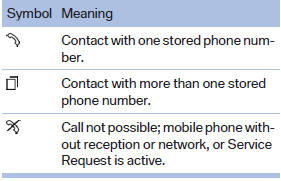
For contacts with one stored phone number: select the required contact. The connection is established.
For contacts with more than one stored phone number: select the required contact and the phone number. The connection is established.
Editing a contact
Changing the entries in "Contacts". When a contact is changed, the changes are not stored on the mobile phone. A copy of the entry is stored in the vehicle.
1. Highlight the contact.
2. Open "Options".
3. "Edit entry"
The contact can be edited.
See also:
Diagnosis OBD
On the driver's side is an OBD socket for checking components relevant to the
composition of the vehicle's emissions. ...
Following part replacement
The same breaking in procedures should be observed
if any of the components mentioned
above have to be renewed in the course of the
vehicle's operating life. ...
Concierge service
General information
The BMW Assist Concierge service offers information
on events, gas stations or hotels, and
provides phone numbers and addresses. Hotels
can be booked directly by the BMW Ass ...