
Entering a phone number
Dialing a number
When entering phone numbers, you can switch between entering letters and numbers.
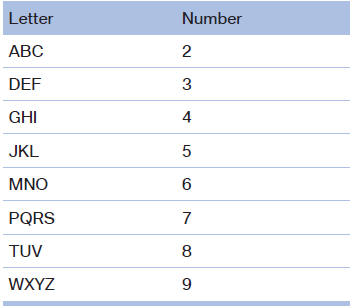
Service numbers can be entered more easily, e. g. 1-888-BMW-CARD.
1. "Telephone".
2. "Dial number".
3. Select the digits individually.
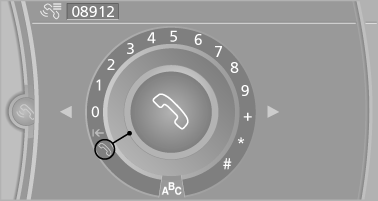
4. Convert to letters as required.
 Select the symbol.
Select the letters individually.
5.  Select the symbol.
 Select symbol to convert to
numbers.
Select symbol to convert to
numbers.
Phone numbers can also be entered by voice.
Only numbers can be spoken.
Letter/number assignment
See also:
Child seat security
Child seat security
The rear safety belts and the front passenger
safety belt can be locked against pulling out for
mounting the child restraint fixing systems.
Locking the safety belt
1. Pul ...
Display
Display
1 Lane departure warning
2 Active Cruise Control
3 Desired speed
4 Navigation system
5 Speed
The collision warning, Night Vision pedestrian
warning, or Check Control messages are dis ...
Functional readiness of the airbag system
When the ignition is switch on, the warning
lamp in the instrument cluster lights
up briefly and thereby indicates the operational
readiness of the entire airbag system
and the belt tensione ...