
Storing favorites
Up to 30 favorites can be stored in the favorites list. Available favorites are artist, track, game, league, and team.
Storing the artist, track, or game
It is only possible to store favorites that are currently being broadcast. The channel information must be available.
1. "Radio".
2. "Satellite radio".
3. If necessary, open "All channels" or the desired category.
4. Select the desired channel.
5. Press the controller again.
6. Select the artist, track, or game.
Storing the league or team
Leagues or teams can be added to the favorites from a selection list.
1. "Radio".
2. "Satellite radio".
3. "Manage favorites".
4. "Add sports information"
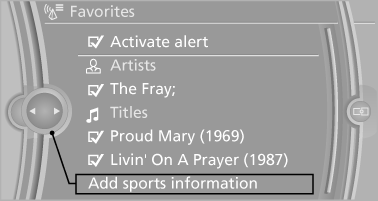
5. Select the league.
6. Select "Add all teams" or the desired team.
See also:
Address book
Selecting a destination from the
address book
1. "Navigation"
2. "Address book"
Contacts with addresses are displayed if
these have been checked as destinations
from among th ...
Updating
Data are updated every time the mobile phone
is connected to the vehicle. Appointment entries,
tasks, notes and reminders can be updated
separately.
1. "Office"
2. "Current offi ...
Image on the Control Display
Switching on the rear view camera using iDrive
With PDC activated:
"Rear view camera"
The image of the rear view camera is displayed.
The setting is stored for the remote control curren ...