
Navigation bar overview
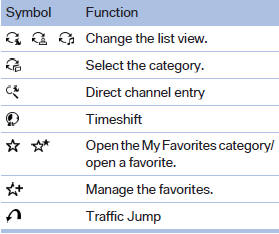
With navigation system: the functions of the navigation bar symbols can also be stored on the programmable memory buttons.
They are stored.
See also:
Switching on/off
To switch the entertainment audio output on or off:
Press knob 1next to the CD/DVD player.
This symbol on the Control Display indicates
that sound output is switched off.
The sound output is ava ...
Address book
Selecting a destination from the
address book
1. "Navigation"
2. "Address book"
Contacts with addresses are displayed if
these have been checked as destinations
from among th ...
Pressure specifications
The tables below provide all the correct inflation
pressures for the specified tire sizes at ambient
temperature.
The inflation pressures apply to the tire sizes
approved and tire brands recomm ...