
Storage compartments in the cargo area
Left storage compartment
A storage compartment is located on the left side.
Net
Small objects can be stowed in the net on the left side.
Right storage compartment
Located on the right side is a storage compartment for the onboard vehicle tool kit, and first aid kit.
Hooks/multi-function hook
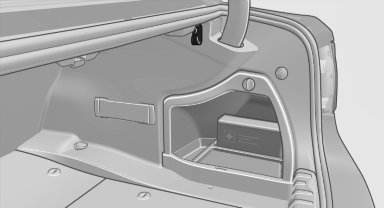
A multi-function hook is located on each side of the cargo area. The multi-function hooks can be loaded up to a max. of 8.8 lbs/4 kg.
 Light and suitable objects only
Only hang light bags or suitable objects from the holders. Otherwise, there is a danger of objects flying about during braking and evasive maneuvers.
Only transport heavy luggage in the trunk if it has been appropriately secured.
Retaining strap
A retaining strap is available on the right side trim for fastening small objects.
Lashing eyes in the cargo area
To secure the cargo, there are four lashing eyes in the cargo area.
Floor net
The floor net can also be used to Secure the load, and to store small parts.
Storage compartment under cargo floor panel
 Maximum load
To avoid damage to the vehicle, do not exceed a maximum permitted load of 44 lbs/20 kg in the storage compartment under the cargo floor panel.
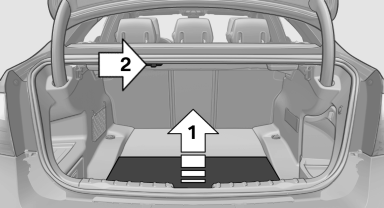
Raise the cargo floor panel, arrow 1, and latch at top, if necessary, arrow 2.
Partitioning the compartment
The compartment can be divided using an attachable partition.
See also:
Side airbags
In a lateral impact, the side airbag supports the
side of the body in the chest and lap area. ...
Interior lamps
General information
The interior lamps, footwell lamps, entry lamps
and courtesy lamps are controlled automatically.
The brightness of some of these lamps is influenced
by the thumbwheel for the ...
Service and Warranty
Information Booklet for US
models and Warranty and
Service Guide Booklet for
Canadian models
Please consult your Service and Warranty Information
Booklet for US models and Warranty and
Service Guide Booklet for Canadian models for
additional information on service requirements.
Mainten ...