
Front passenger side
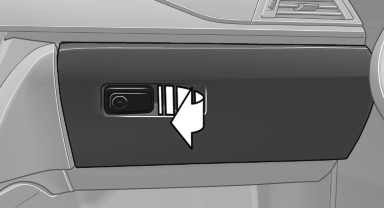
Opening
Pull the handle.
The light in the glove compartment switches on.
The net in the glove compartment is provided for stowing the storage tray for the cupholder.
 Close the glove compartment
again immediately
Close the glove compartment
again immediately
Close the glove compartment immediately after use while driving; otherwise, injury may occur during accidents.
Closing
Fold up the cover.
Locking
The glove compartment can be locked with an integrated key to separately secure the trunk lid, for example.
After the glove compartment is locked, the remote control can be handed over, such as at a hotel, without the integrated key.
This prevents access to the glove compartment and to the cargo area.
USB interface for data transfer
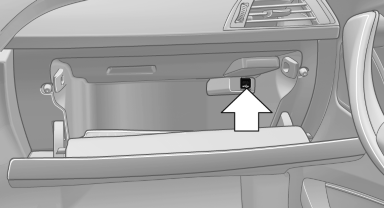
USB interface for data transfer
Connection for importing and exporting data on USB devices, e.g.:
▷ Personal Profile settings.
▷ Music collection.
Observe the following when connecting:
▷ Do not use force when plugging the connector into the USB interface.
▷ Do not connect devices such as fans or lamps to the USB interface.
▷ Do not connect USB hard drives.
▷ Do not use the USB interface to recharge external devices.
See also:
Low tire pressure message
The small warning
lamp lights up yellow
and the large warning lamp lights
up red. A message appears on the
Control Display. In addition, a signal
sounds.
▷ There is a flat tire or a ...
Oil types for refilling
Notes
No oil additives
Do not use oil additives as these may
cause engine damage.◀
Viscosity classes of engine oils
When selecting an engine oil, ensure that
the engine oil belongs t ...
Important features in the engine compartment
BMW X5
BMW X5
1. Filler neck for washer fluid for the headlamp
and window washer system
2. Starting aid terminal
3. Coolant expansion tank
4. Engine oil filler neck
BMW X6
BMW ...