
Front ventilation
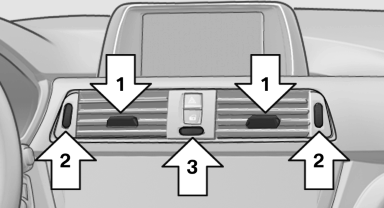
Front ventilation
▷ Lever for changing the air flow direction, arrow 1.
▷ Thumbwheels for opening and closing the vents continuously, arrows 2.
▷ Thumbwheel to vary the temperature, arrow 3.
Toward blue: colder.
Toward red: warmer.
Adjusting the ventilation
▷ Ventilation for cooling:
Adjust the vent to direct the air in your direction,
e.g., if the vehicle interior is hot from
the sun.
▷ Draft-free ventilation:
Adjust the vent to let the air flow past you.
See also:
Clean the windshield, headlamps
Clean the windshield, headlamps
Pull the lever.
The system sprays washer fluid on the windshield
and activates the wipers briefly.
In addition, the headlamps are cleaned at regular
interval ...
For your own safety
Maintenance and repairs
Advanced technology, e.g., the use of modern
materials and high-performance electronics, requires suitable maintenance and
repair methods.
Therefore, have this work perfo ...
The concept
The system is functional at speeds beginning at
approx. 20 mph/30 km/h.
It maintains the speed that was set using the
control elements on the steering wheel.
The system brakes on downhill gradie ...