
Display in the instrument cluster
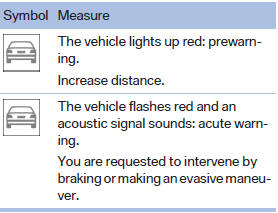
The collision warning can be issued in the instrument cluster, in the Head-up Display, and acoustically.
Warning stages
 Adapting your speed and driving style
The display does not relieve the driver of the responsibility to adapt his or her driving speed and style to the traffic conditions.
See also:
Tilt alarm sensor
The tilt of the vehicle is monitored.
The alarm system responds in situations such
as attempts to steal a wheel or when the car is
towed. ...
Brightness
Setting the brightness
To set the brightness of the Control Display:
1. "Settings"
2. "Control display"
3. "Brightness"
Brightness"
4. Turn the controller un ...
Units of measure
Setting the units of measure
To set the units for fuel consumption, route/distance
and temperature:
1. "Settings"
2. "Language/Units"
3. Select the desired menu item.
...