
Buttons at a glance
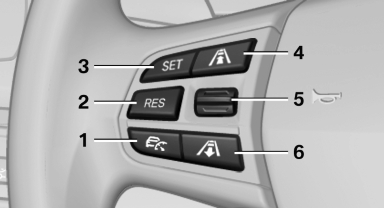
Buttons at a glance
1 System on/off, interrupt
2 Resume speed
3 Store speed
4 Reduce distance
5 Store, maintain/change speed
6 Increase distance
See also:
Manual destination entry
General information
The system supports you in entering street
names and house numbers by automatically
completing the entry and providing entry comparisons,
refer to page 21.
Stored town/city ...
Opening
▷ Press the switch to the
resistance
point.
The window opens while the switch is held.
▷ Press the switch beyond the
resistance
point.
The window opens automatically.
Pressin ...
Status of this Owner's Manual at time of printing
BMW pursues a policy of continuous, ongoing development that is conceived to
ensure that our vehicles continue to embody the highest quality and safety standards
combined with advanced, state-of-t ...