
Brake force display
The concept
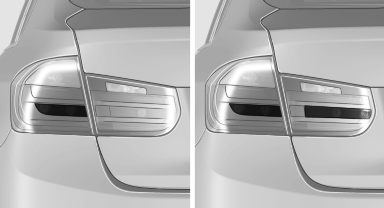
▷ During normal brake application, the outer brake lamps light up.
▷ During heavy brake application, the inner brake lamps light up in addition.
See also:
Closing
Danger of pinching
Monitor the closing process and make
sure that the closing path of the window is clear;
otherwise, injuries may result.
Pull the switch to the resistance point.
The win ...
Buttons on the remote control
1 Unlocking
2 Locking
3 Opening the tailgate
4 Panic mode, headlamp courtesy delay feature ...
Voice phone book
Depending on how your vehicle is equipped, it
may be necessary to create your own voice
phone book.
The entries must be entered using voice activation
and are separate from the memory in the
...