
Display
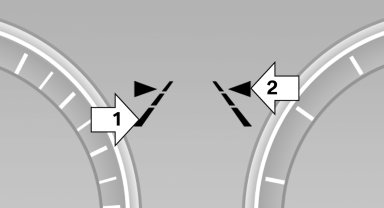 Display
▷ Lines, arrow 1: the system is activated.
▷ Arrows, arrow 2: at least one lane marking was detected and warnings can be issued.
See also:
Open trunk lid with no-touch activation
With Comfort Access, the trunk lid can be
opened with no-touch activation using the remote
control you are carrying.
A sensor detects a directed foot motion in the
center of the area at the rea ...
Trip computer
There are two types of computer.
▷ "Onboard info": the values can be reset as
often as necessary.
▷ "Trip computer": the values provide an overview
of the current ...
Controls
Almost all functions can be operated in the same
manner as they are in the front. Special features
of operating the system in the rear are described
here. ...