
Welcome lamps
When parking the vehicle, leave the switch in
position  or
or
 : the parking and interior
lamps light up briefly when the vehicle is unlocked.
: the parking and interior
lamps light up briefly when the vehicle is unlocked.
Activating/deactivating
1. "Settings"
2. "Lighting"
3. "Welcome light"
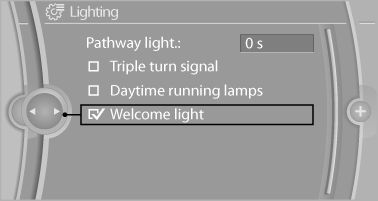
The setting is stored for the remote control currently in use.
See also:
Adding engine oil
Filler neck
When the indicator lights up in the instrument
cluster, add 1 US quart/liter of engine oil within
the next 125 miles/200 km.
Do not add too much engine oil
When too much engine o ...
Camera monitoring: Lane Departure Warning System and Collision Warning
The Lane Departure Warning System available for the new BMW 3-Series Sedan is
activated at speeds above 70 km/h (43 mph) and warns the driver if he
unintentionally strays out of his lane. The syst ...
Map view for split screen
The map view can be selected for the split
screen independently from the main screen.
1. "Options" Open.
2. "Split screen"
3. Move the controller to the right repeatedly
unt ...