
Units of measure
Setting the units of measure
To set the units for fuel consumption, route/distance
and temperature:
1. "Settings"
2. "Language/Units"
3. Select the desired menu item.
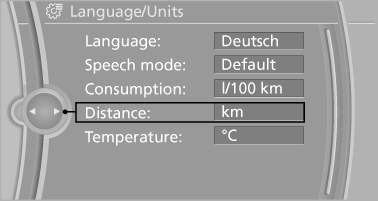
4. Select the desired unit.
The setting is stored for the remote control currently in use.
See also:
Information on the navigation data
1. "Navigation".
2. "Options" Open.
3. "Navigation system version": information on
the data version is displayed. ...
Opening and closing: From inside
This button serves to unlock or lock doors and the trunk lid, but does not activate
the anti-theft system. The fuel filler flap remains unlocked.
Automatic lockingYou can also set the situations ...
Condition Based Service CBS
Sensors and special algorithms take into account
the driving conditions of your vehicle.
Based on this, Condition Based Service determines
the maintenance requirements.
The system makes it possi ...