
Time
Setting the time
1. "Settings"
2. "Time/Date"
3. "Time:"
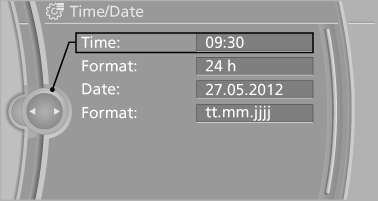
4. Turn the controller until the desired hours
are displayed.
5. Press the controller.
6. Turn the controller until the desired minutes
are displayed.
7. Press the controller.
The time is stored.
Setting the time format
1. "Settings"
2. "Time/Date"
3. "Format:"
4. Select the desired format.
The time format is stored.
See also:
BMW 650i in the Market
I may prefer the Jaguar to the BMW, but the 650i is still a remarkable
machine that will find plenty of fans among current BMW owners. Does it deliver
a luxurious convertible interior and a gorgeo ...
Sound output
Switching on/off
When the ignition is switched off: press ON/OFF
button on the radio.
Muting
When the ignition is switched on or the engine
is running: press the ON/OFF button on the
radio. ...
Airbags
1. Front airbag, driver
2. Front airbag, front passenger
3. Head airbag
4. Side airbag
5. Knee airbags
Front airbags
Front airbags help protect the driver and front
passenger by responding t ...