
Display on the Control Display
Display the computer or trip computer on the Control Display.
1. "Vehicle Info"
2. "Onboard info" or "Trip computer"
Resetting the fuel consumption or speed
1. "Vehicle Info"
2. "Onboard info"
3. "Cons." or "Speed"
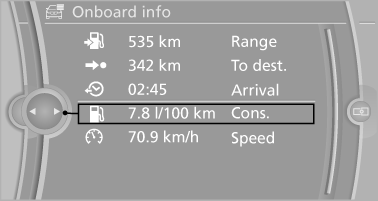
4. "Yes"
See also:
BMW X5 xDrive50i: BMW's Twin-Turbocharged V-8.
The new BMW X5 xDrive50i takes its place as the flagship of the X5 family,
yielding 400 horsepower at 5,500 rpm and 450 lb-ft of torque at 1,750 - 4,500
rpm from its twin-turbocharged 4.4 liter V- ...
Lane information
On multi-lane roads, the recommended lanes
are marked in the arrow view by a triangle.
▷ Solid triangle: best lane.
▷ Empty triangle: possible lane. However, another
lane change may ...
Using contact data
At a glance
Contact data from appointments, tasks, text
messages, emails and notes can be stored or
selected.
Displaying contact or selecting phone
number
1. "Use contact data".
2. ...