
Calling up information on the info display
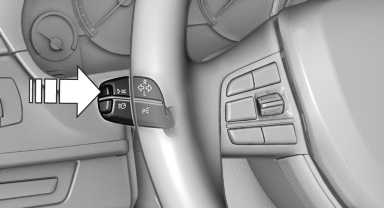
Calling up information on the info display
Press the onboard computer button on the turn signal lever.
Information is displayed on the info display of the instrument cluster.
See also:
Rear seat heating
Rear seat heating
Switching on
Press the button once for each
temperature
level.
The maximum temperature is reached when
three LEDs are lit.
If the drive is continued within approx. 15 mi ...
Short commands of the voice activation
system
Vehicle equipment
All standard, country-specific and optional
equipment that is offered in the model series is
described in this chapter. Therefore, equipment
is also described that is not avai ...
Power failure
After a temporary power loss, some equipment
needs to be reinitialized.
Individual settings need to be reprogrammed:
▷ Seat, mirror, and steering wheel memory:
store the positions again.
...