
Fuel gauge
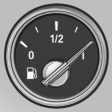
The vehicle inclination may cause the display to vary.
Notes on refueling.
See also:
Clock
The settings are stored for the remote control currently in use, refer also to
Personal Profile on page 28.
Setting the timeIn the instrument cluster
To set the 12h/24h format, refer to Se ...
First aid kit
The first aid kit is located in a storage compartment
on the right side in the cargo area.
Some of the articles contained in the first aid
pouch have a limited service life.
Check the expiration ...
Requirements
Via the Control Display, set a language that is
also supported by the voice activation system
so that the spoken commands can be identified.
Set the language. ...