
Hiding Check Control messages
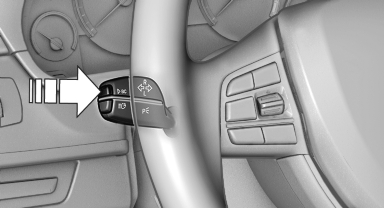
Press the computer button on the turn signal lever.
▷ Some Check Control messages are displayed continuously and are not cleared until the malfunction is eliminated. If several malfunctions occur at once, the messages are displayed consecutively.
These messages can be hidden for approx.
8 seconds. After this time, they are displayed again automatically.
▷ Other Check Control messages are hidden automatically after approx. 20 seconds.
They are stored and can be displayed again later.
See also:
Gas station recommendation
The remaining range is calculated, and if necessary
gas stations along the route are displayed.
Even with the most current navigation data, information
regarding individual gas stations may
hav ...
Climate control functions in detail
Temperature
Turn the wheel to set the desired
temperature.
The automatic climate control reaches this temperature
as quickly as possible, if necessary by
increasing the cooling or heating ou ...
The concept
Mobile phones or other external devices such as
audio players can be connected to the vehicle
via Bluetooth.
After these devices are paired once, they are
recognized automatically when the igni ...