
Overview, instrument cluster with enhanced features
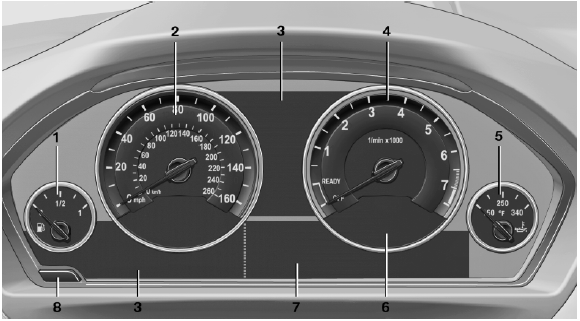
Overview, instrument cluster with enhanced features
1 Fuel gauge
2 Speedometer
3 Indicator/warning lamps
4 Tachometer
5 Engine oil temperature
6 Current fuel consumption
7 Electronic displays
8 Display/reset miles
See also:
Bluetooth audio
At a glance
▷ Music files on external devices such as audio
devices or mobile phones can be played
back via Bluetooth.
Use of a mobile phone as an audio source.
▷ The sound is outpu ...
System limits
Check the traffic situation as
well
PDC cannot serve as a substitute for the
driver's personal judgment of the traffic situation.
Check the traffic situation around the vehicle
with your own ...
Charismatic front, elegant side, muscular rear.
The expressive front end of the new BMW 5-Series Sedan presents the sporting
character of the car. The upright BMW kidney grille - even appearing from some
angles to lean forward - symbolizes the ...