
Overview, instrument cluster
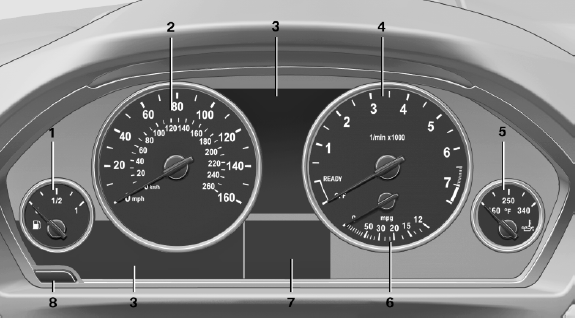
Overview, instrument cluster
1 Fuel gauge
2 Speedometer
3 Indicator/warning lamps
4 Tachometer
5 Engine oil temperature
6 Current fuel consumption
7 Electronic displays
8 Display/reset miles
See also:
Destination entry by voice
General information
► Instructions for voice activation system, refer
to page 22.
► When making a destination entry by voice,
you can change between voice operation
and iDrive.
υ ...
AUTO program
Press the button.
Air volume, air distribution, and temperature are
controlled automatically:
Depending on the selected temperature, AUTO
intensity, and outside influences, the air is directed ...
Contacts
...