
Adjusting the height
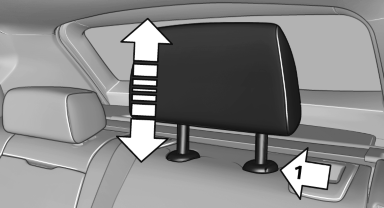
Adjusting the height
▷ To raise: pull.
▷ To lower: press the button, arrow 1, and push the head restraint down.
The center head restraint cannot be adjusted in elevation.
See also:
Performance
What sets the 5 Series wagon apart from the A6 and E-Class is the way it
drives. Sure, its looks scream BMW inside and out, but so does the sweetly
smooth acceleration coming from the twin-turbo s ...
Managing the favorites
Activating/deactivating the favorites
Favorites can be activated and deactivated
globally and individually.
1. "Satellite radio"
2. "Manage favorites"
3. Select "Activa ...
Show contact pictures
Pictures stored with the contacts are stored in
the vehicle when the mobile phone is connected
to the vehicle. The number of transmitted pictures depends on the mobile phone.
The mobile
phone ...